How to choose vacation rental management software
A criteria framework for the decision you only want to make once — how to scope your operation, test capabilities that matter, decode pricing models and run a trial that produces evidence.

Ryan J
Co-Founder, PropertyStack · · 15 min read
Contents
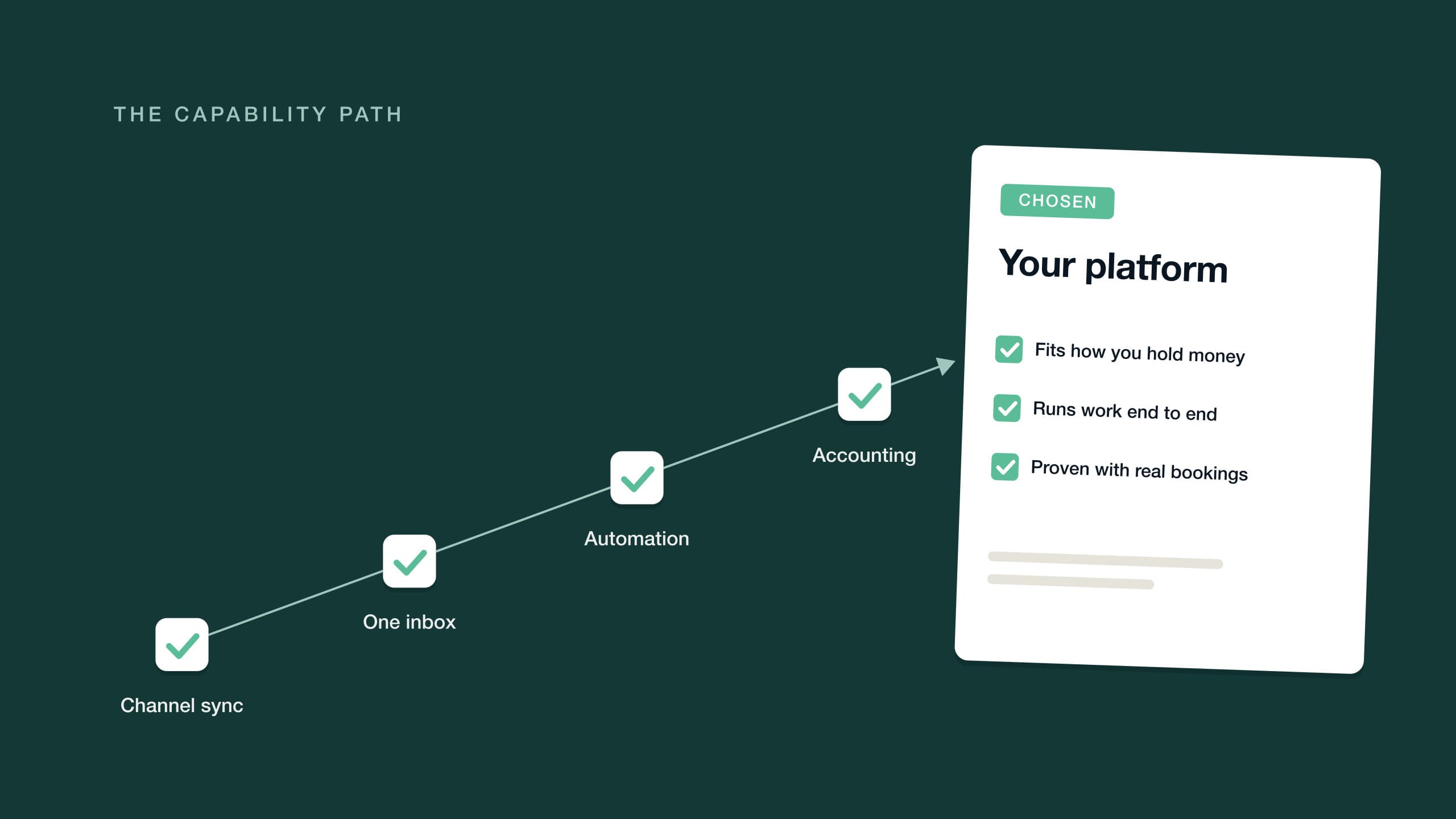
The expensive mistake in choosing vacation rental management software isn't the subscription — it's the migration you run later if you choose wrong. Listings, bookings, guest history, automations and accounting all have to move, and that work lands at exactly the moment you can least absorb it: when you're growing.
That risk should change how you shop. Most buying processes start with a feature comparison and end with whichever platform demos best. A better process starts with your operation — the one you run today and the one you intend to run — and works backward to the capabilities that support both. Choose for the operation you're becoming, and you only make this decision once.
This guide is a criteria framework, not a review roundup. It covers how to scope your requirements, the real difference between a PMS and a channel manager, a capability checklist to test candidates against, the honest trade-offs between all-in-one platforms and point solutions, how pricing models actually work, and a 30-day trial plan that produces evidence instead of impressions.
Start with your operation, not a feature list
Feature lists are how vendors differentiate; they're a poor way to decide. Every serious platform claims calendar sync, guest messaging and automation. The differences that matter only show up when you hold those claims against the specifics of your operation. Four questions do most of the scoping.
How many properties, and what kind? A host with three beach houses, a manager with forty scattered condos and a boutique operator with one building of twelve rooms all shop in the same software category and need different things from it. Portfolio size decides how much you should care about bulk operations, per-property settings and a multi-calendar that stays readable; property type decides whether same-day turnovers, mid-stay cleans or longer corporate stays dominate your workload.
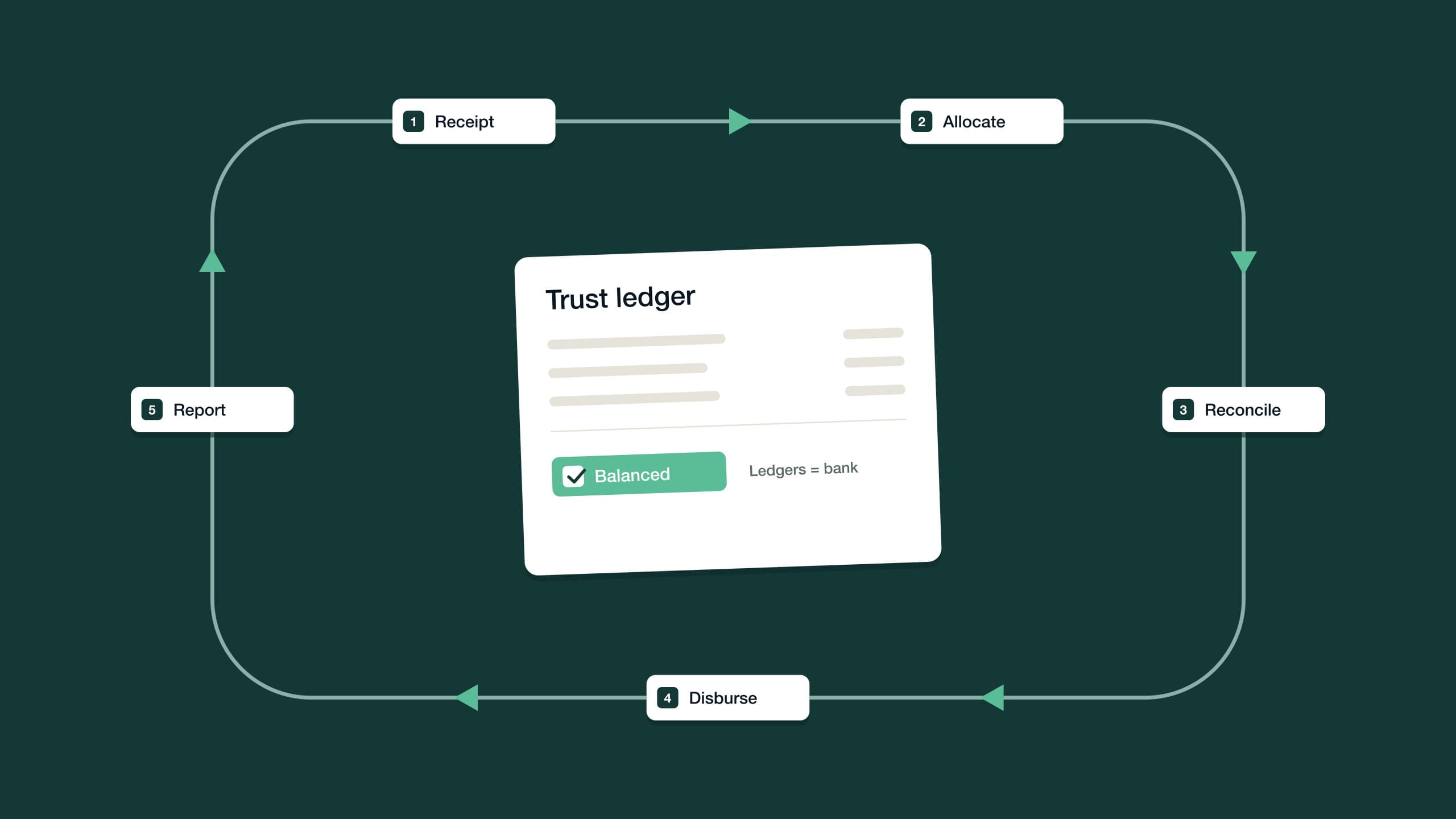
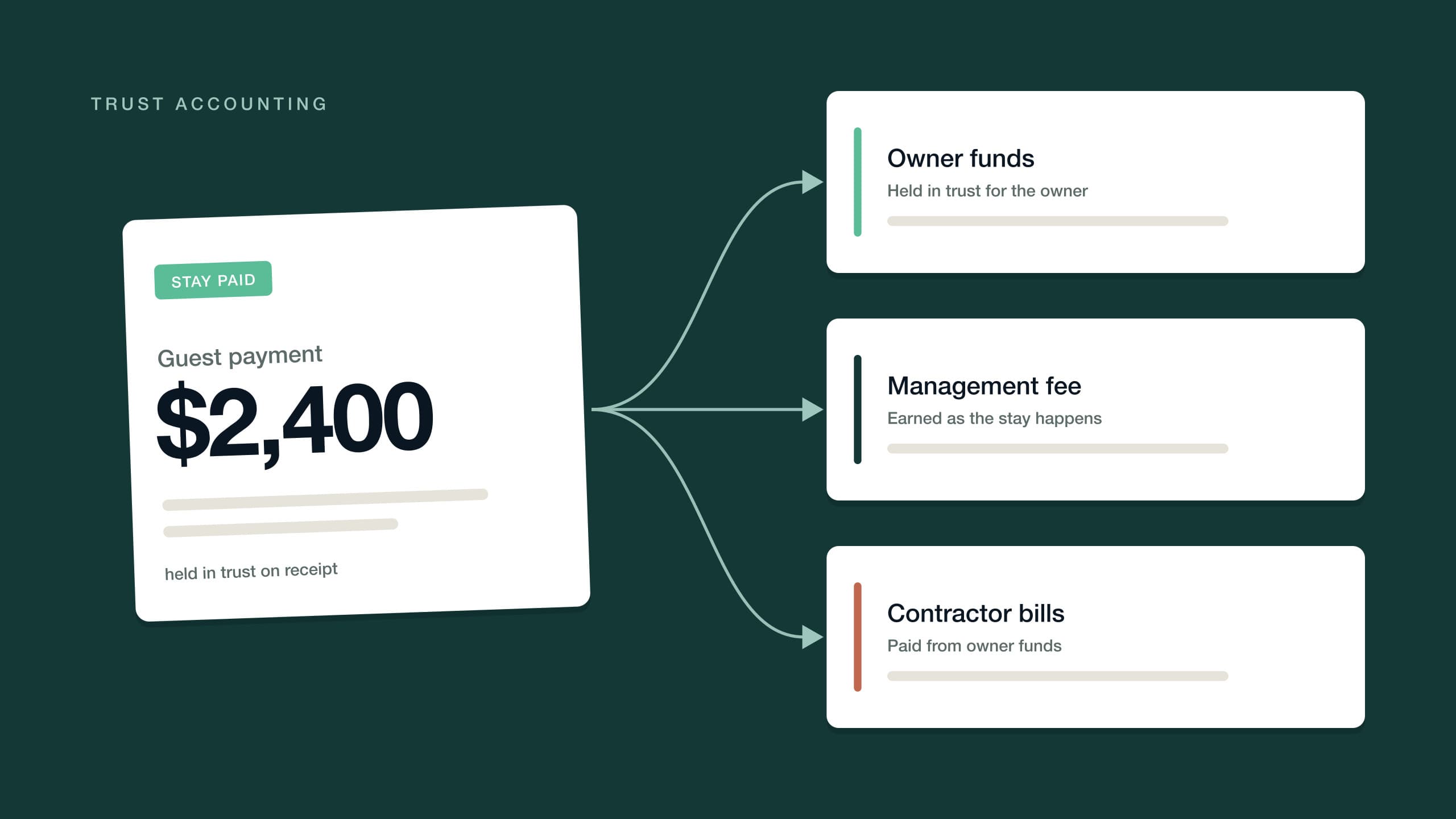
Do you own the properties, or manage them for owners? This one answer changes everything about the accounting you need. If every dollar moving through the business is yours, good bookkeeping is enough. The moment you hold money that belongs to someone else — owner income, guest deposits, contractor payments made on an owner's behalf — you're into trust accounting: separated funds, a ledger per owner, and reconciliation that proves the books balance. If the term is new, start with our plain-English explainer on what trust accounting is. Platforms that treat accounting as an afterthought fail managers on exactly this line.
How many people work in it? A solo operator needs deep automation and a genuinely usable mobile app, because there's no one to hand work to. A team needs assignment, permissions and shared visibility — who's answering this guest, who owns this maintenance job, what has already been promised. Shared context is a capability in its own right; test for it.
What does the operation look like in two years? This is where choosing for what you're becoming gets concrete. If you plan to take on managed properties for owners, buy the accounting for that now, not when the first owner signs. If you plan to double the portfolio, evaluate every workflow at double the volume. The platform that fits today's operation and says nothing about tomorrow's is the one that schedules your next migration.
What is a PMS vs a channel manager?
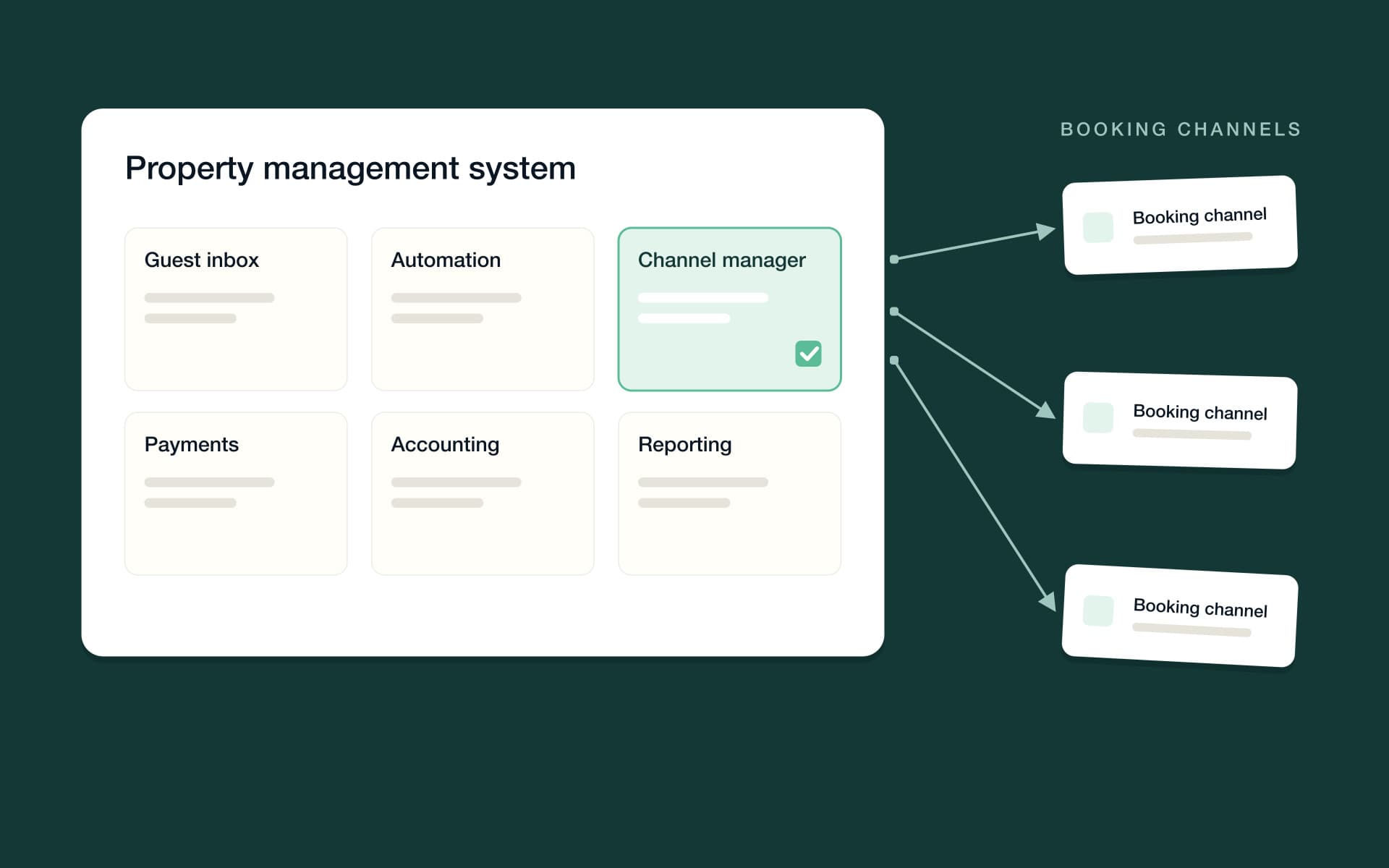
A channel manager does one job: it syncs rates, availability and bookings between your listings and channels like Airbnb, Booking.com and Vrbo, so you never double-book. A property management system (PMS) is the operating platform for the whole business — it includes channel management and adds the guest inbox, automation, task management, payments, accounting and reporting on top.
The confusion exists because the categories overlap from both directions: every PMS contains a channel manager, and some channel managers have grown inbox or website features. The practical rule is simple. If your entire need is keeping a few listings in sync while you run everything else by hand, a standalone channel manager can be enough. Most operators asking the how-to-choose question have already outgrown that — what they're really buying is the PMS, and the channel manager inside it should be judged as a component.
It is the foundational component, though, and sync quality is not a commodity. How fast rate changes propagate, how cancellations flow back, how each channel's fees and policies are represented — a channel manager for vacation rentals has to get all of it right, or every module downstream operates on wrong data.
Vacation rental software features: the capability checklist
Test every candidate against the same list, in the same order. The order matters — the first two items are foundations, and no owner portal or AI badge can compensate for a calendar that drifts or messages you never saw.
Calendar and channel sync
The baseline: every booking from every channel on one calendar, with rates and availability pushed back out in real time. Look for a multi-calendar that stays readable at your portfolio size, per-channel control of rates, fees and cancellation policies, and straight answers about propagation speed. Ask each vendor what happens in the minutes after a direct booking lands — that window is where double-bookings live.
Two details separate adequate sync from good sync. First, the calendar should be an instrument, not just a display — gap nights, unassigned turnovers and rate anomalies should be visible at a glance, because that's where revenue quietly leaks. Second, ask how the platform handles the messy cases: a channel-side cancellation at midnight, an overlapping modification, a listing paused on one channel but live on another. Every vendor is fluent about the happy path; the edge cases are where you actually learn.
Unified guest inbox
Guests write on the channel they booked through, then switch to text or email mid-stay. A unified inbox puts every message from every channel into one thread per guest, with the booking, property and payment context beside it. Without one, your team answers from five tabs, and response times depend on which tab happens to be open. If you run a team, look for assignment, tagging and internal notes on the thread itself.
Automation depth: rules, workflows or agents
Automation is where platforms differ most and where the marketing is least precise. It helps to think in three tiers. Rules are single if-this-then-that actions: send the check-in message three days before arrival. Workflows chain steps with triggers, branches and delays: when a booking confirms, send the confirmation, schedule the guidebook, create the cleaning task, queue the review request. Agents do the work end to end: read the maintenance request, pick the contractor, book the time, keep everyone updated, close the job once it's verified done.
That third tier is what "AI-powered" should actually mean — agents completing work under guardrails you set, with approval thresholds, escalation rules and hard limits on what they may never do. It does not mean a chatbot that drafts replies for you to send. When a vendor says AI, ask two questions: what does it finish on its own, and what controls do I have over it? For a deeper walkthrough of the tiers and what to automate first, see our guide to Airbnb automation.
Ask what the AI finishes on its own. If the answer is a draft, it's a chatbot; if the answer is a closed job, it's an agent.
Accounting: bookkeeping or trust accounting
Here's the decisive question from earlier, applied. If you only manage properties you own, you need clean books: income and expenses per property, channel payouts recorded correctly, reports your accountant can use. Plenty of platforms handle this adequately.
If you manage for owners, the bar moves. You need real trust accounting software: a ledger per owner, receipting that splits bundled channel payouts to the right ledgers, three-way reconciliation proving the bank, the cashbook and the sum of the ledgers agree, and owner statements generated from those same records. Many platforms offer bookkeeping and label it accounting; genuine trust accounting is rarer, and it's the hardest capability to bolt on later. Requirements vary by jurisdiction — confirm with your local regulator — but the operational need is universal. Our pillar on trust accounting for short-term rentals covers what to verify in detail.
Owner portal
If owners are your clients, their experience of you is mostly statements and answers. An owner portal gives them self-serve access to statements, payouts, documents and performance, which removes most month-end questions before they're asked. Check whether the portal is live data or emailed PDFs behind a login page, and whether owners can get an answer without adding to your inbox.
Payments
Money collection should be a schedule, not a task list. Look for automatic guest charges — deposits, balance collection before arrival, retries on failed cards, security holds — then follow where the money lands. Payments that flow straight into the accounting module, matched to the booking, are what make month-end fast. Payments that live in a separate processor's dashboard are a reconciliation job you just hired yourself for.
Direct-booking website
Repeat guests shouldn't cost you channel commission. A direct-booking website earns its place when it's a real storefront: live availability from the same calendar, payments through the same system, guest messages into the same inbox. Judge it like a booking channel, not a brochure — if a direct booking behaves differently from a channel booking anywhere downstream, you'll pay for the difference in manual work.
Mobile
The job doesn't happen at a desk. Confirm the platform runs the real operation from a phone — inbox, calendar, tasks, and an alert the moment something needs a decision — and test it on your own phone during the trial, standing in a parking lot between turnovers, not in the vendor's demo. If the mobile experience is a shrunken dashboard, the platform assumes an office you may not have.
All-in-one property management software vs a stack of point solutions
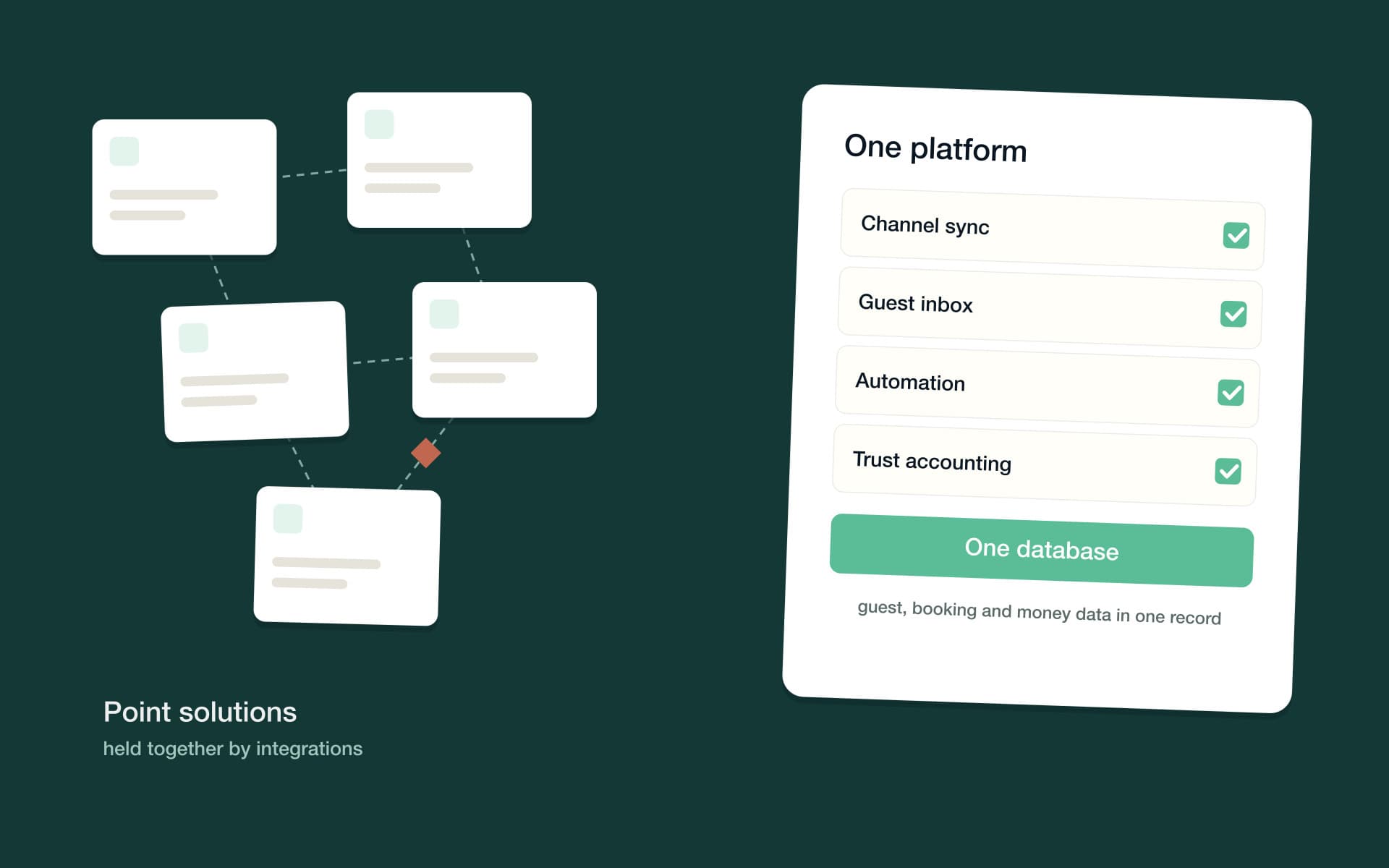
There are two ways to assemble the checklist above: one platform that does all of it, or a stack of specialist tools connected by integrations. Both can work, and each carries a real cost — the comparison deserves to be made honestly.
| Trade-off | All-in-one platform | Stack of point solutions |
|---|---|---|
| Setup | One implementation, one learning curve | Each tool configured, then connected to the rest |
| Depth | Strong across the workflow; occasionally shallower in a niche | You can pick the deepest specialist for every job |
| Data | One database — guest, booking and money data stay connected | Each tool keeps its own copy, synced through integrations |
| Automation | Can span the operation: a message creates a task that hits the ledger | Stops at each tool's edge unless you build the bridge |
| When something breaks | One vendor owns the answer | Vendors can point at each other's integration |
| Swapping one piece | You change platforms, not parts | You can replace a single tool without replatforming |
The stack's true cost is rarely the subscriptions — it's the seams. Every integration is a sync to configure, monitor and second-guess, and every seam is a place where a canceled booking exists in one tool and not another. The all-in-one risk is the mirror image: one weak module you can't swap out. That's exactly what the checklist and the trial are for — an all-in-one platform earns the choice only by being genuinely strong at the capabilities your operation depends on most.
How do vacation rental software pricing models work?
Most pricing in this category combines up to three components. None of them is inherently good or bad — what matters is whether you can predict your bill at twice your current size.
- A per-property base. A monthly amount per listing, sometimes tiered by portfolio size. Predictable and easy to compare. Ask what happens at tier boundaries, whether there's a minimum, and exactly which capabilities sit in the base versus being sold as add-ons.
- Usage components. Charges that scale with activity rather than portfolio — payment processing, phone or messaging usage, connected devices like smart locks, premium modules. Fair in principle, opaque in practice if you don't model them. Ask for the all-in effective cost at your real volumes, in writing.
- A revenue share. A percentage of some revenue. The critical question is which revenue: a share of everything you earn is simply a variable price, while a share only of new revenue the platform itself generates — upsells it sold for you — puts the vendor's incentive next to yours. Make the vendor define the base precisely.
Whatever the mix, put the same three questions to every vendor: what will I pay in month one, what will I pay at twice my portfolio, and which items on the capability checklist cost extra? A vendor that can't answer the second question quickly has designed the answer to be discovered later.
Then compare candidates on annual effective cost at your portfolio size, not sticker price. For a live example of a blended structure, PropertyStack's pricing scales with what you use — a platform base per property, plus the AI agents you switch on, plus a share of the new revenue the AI generates for you — and plans start at $50/month.
How to run a meaningful 30-day trial
A demo shows you the vendor's best path; a trial shows you yours — but only if you run it like a project, with a plan, real bookings and an exit criterion. Thirty days is enough to produce evidence instead of impressions if you spend each week deliberately.
One more discipline before day 1: write the exit criteria down. Decide in advance what evidence would make you commit and what would make you walk — sync behavior you can live with, an inbox your team actually adopts, a payout that reconciles without a workaround. A trial without pass/fail criteria drifts into a free month of software, and you end up making the same gut-feel decision you were trying to avoid, just later.
- Week 1 — connect and verify the foundations. Connect your channels and import listings, then audit everything: rates, fees, minimum stays and policies correct on every channel, and the calendar matching reality exactly. Change a rate and watch how long it takes to appear everywhere. If week 1 shakes your confidence in sync, stop — nothing later will change the verdict.
- Week 2 — run real stays through it. Move live guest messaging into the inbox and build your core automations: booking confirmations, check-in instructions, review requests. Verify messages fire on time for real arrivals, cleaning and turnover tasks generate themselves from bookings, and your team can genuinely work in it — assign a thread, hand off a task.
- Week 3 — follow the money. Collect real payments on schedule, place a deposit or security hold, and reconcile a channel payout against the bookings it covers. If you manage for owners, run an owner statement and read it as skeptically as your most detail-oriented owner would. Money is where weak platforms hide their gaps.
- Week 4 — stress it, then decide. Break things on purpose: cancel a booking, change dates, issue a partial refund, and watch every downstream record react. Work a full day from your phone. Ask support a genuinely hard question and time the answer. Then close out the month in the accounting module and make the call on four weeks of evidence.
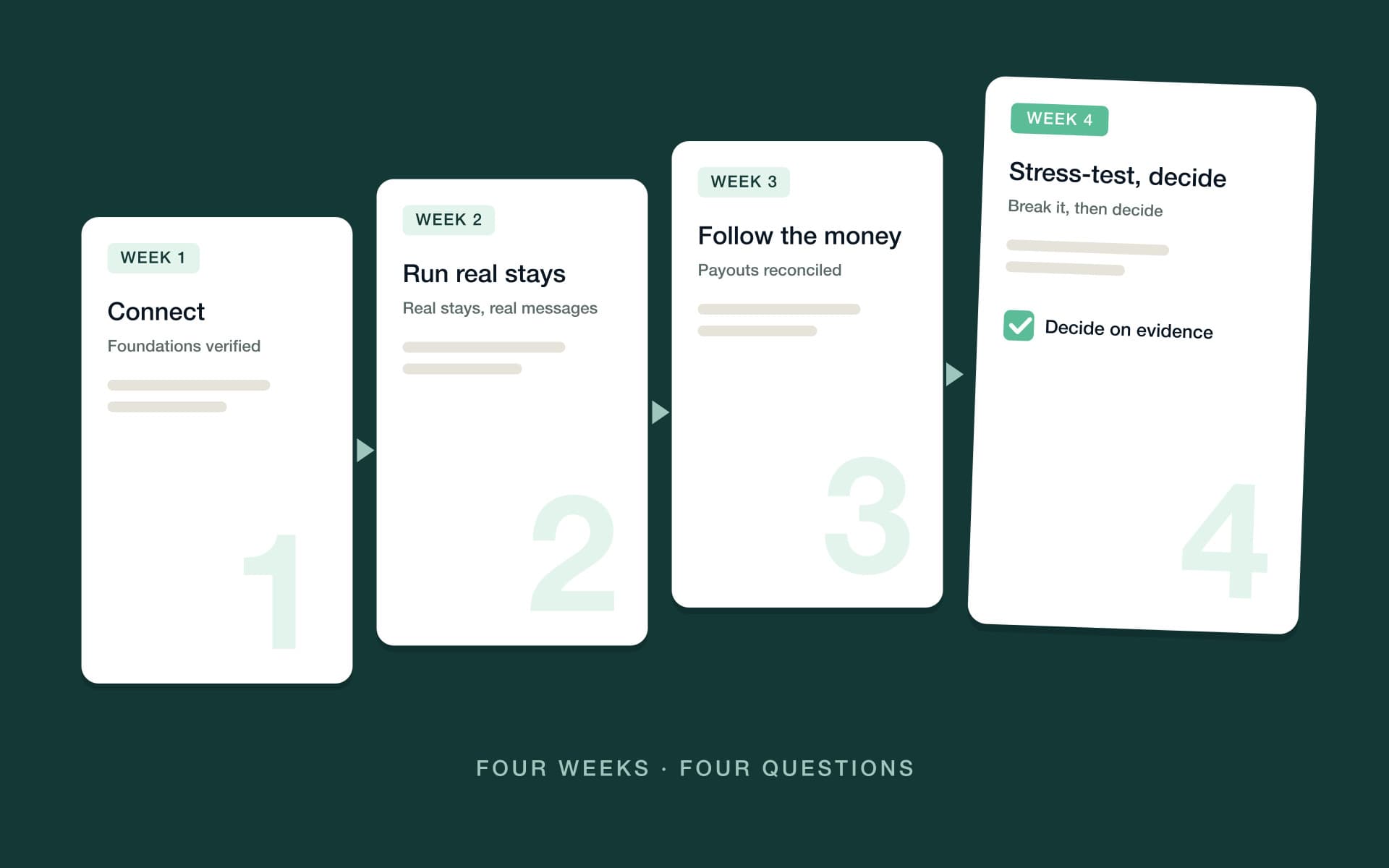
By day 30 you're no longer deciding on claims. You know how sync behaves, whether automation fired for real guests, whether a payout reconciled cleanly, and what support is like on a bad day. That's the difference between choosing a platform and re-choosing one later.
Red flags worth walking away from
Some signals reliably predict regret. None is automatically disqualifying on its own, but two or more together should end the conversation.
- Long minimum contracts before you've processed a booking. Software that keeps its customers doesn't need to lock them in. A long term demanded up front shifts the retention risk from the vendor to you — precisely backwards.
- Per-feature upcharges that punish growth. A low base with every capability you'll eventually need sold separately means the effective price climbs faster than your portfolio. Price the whole checklist, not the entry point.
- "AI" that is a chatbot. If the AI's job ends at drafting text for you to send, it's autocomplete with a marketing budget. Ask what work it completes end to end, and what guardrails and approval thresholds you control.
- No trust accounting when you manage for owners. A general ledger plus an export is not per-owner ledgers plus three-way reconciliation. If the vendor's answer involves a spreadsheet or a third tool, the platform doesn't fit your operation.
- A hard exit. Ask how you'd leave: which data exports, in what format, at what cost. A vendor that makes leaving difficult is telling you how they plan to keep you.
Where PropertyStack fits
This guide works without vendor names, but it's fair to show our own hand against it. PropertyStack, an agentic property management platform for short-term rentals, is built as the all-in-one column of the table above — genuinely all-in-one, built natively rather than stitched together from integrations, so data, automations and AI work from one source of truth.
Against the checklist: channel sync across Airbnb, Booking.com and Vrbo plus your own direct-booking site; guest messaging across SMS, WhatsApp, email and the AI phone line, all in one inbox; and trust accounting built to be reconciled and audit-ready to your jurisdiction's standard, with per-owner ledgers and end-of-month runs. On automation depth, PropertyStack sits in the third tier: AI agents do the work end-to-end — answering guests, scheduling maintenance, reconciling accounts — under guardrails and approval thresholds you set, escalating to a human when something genuinely needs one. You can see how the pieces fit an operation like yours on the short-term rental management software page.
And the trial plan above is how we'd suggest evaluating PropertyStack too: book a demo, bring your own scenarios, and test every claim in this guide against your own operation before you commit.
Frequently asked questions
The short version, for the questions operators ask most.
A channel manager syncs rates, availability and bookings across channels like Airbnb, Booking.com and Vrbo. A property management system (PMS) includes channel management and adds the inbox, automation, payments, accounting and reporting you run the operation on. Most operators need a PMS; the channel manager is one component of it.
Calendar and channel sync that never double-books, a unified guest inbox, automation that completes work rather than drafting it, and accounting that matches how you hold money. If you manage properties for owners, add per-owner ledgers, owner statements and an owner portal to the non-negotiable list.
If you only manage properties you own, good bookkeeping is enough. If you hold money that belongs to others — owner income, guest deposits — you need trust accounting: separated funds, per-owner ledgers and routine reconciliation. Requirements vary by jurisdiction, so confirm the rules with your local regulator.
Pricing typically combines a per-property base with usage components, and sometimes a revenue share — compare annual effective cost at your portfolio size. PropertyStack's pricing scales with what you use: a platform base per property, plus the AI agents you switch on, plus a share of the new revenue the AI generates for you. Plans start at $50/month.
Long enough to push real bookings through it — 30 days covers connecting channels, running live guest stays, collecting payments, reconciling a payout and closing a month.
Still have questions?
Ask PropertyStack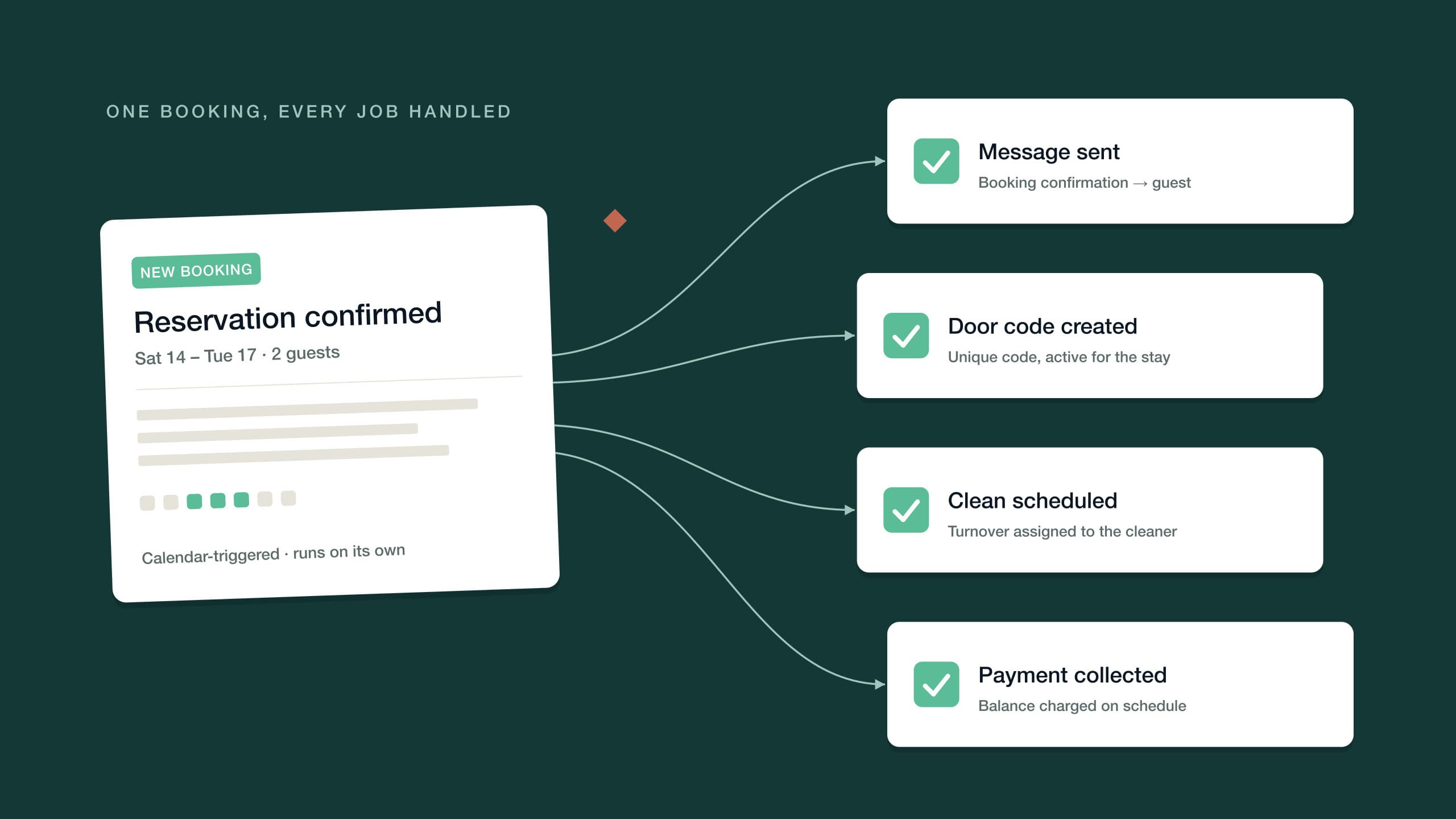

See it on your own listing. Free, from one link.
Paste an Airbnb listing and we'll show you what it could look like — a rewritten title, description, photos and a task list from your reviews.
- Syncs with every channel
- Cancel anytime
- AI agents with Pro